Showing posts with label Blogging. Show all posts

Tuesday, August 18, 2015

Two on Tuesdays : More Website Ideas

I'm sneaking this in just before I have to rename my Two on Tuesdays to, I don't know, Website Wednesdays???  Here are a few more ideas, building on my videos from last week, of ways to maximize the effectiveness of your webpages while minimizing the time you spend keeping it updated.


1. Here is a short video showing how to share documents with students and parents in four different ways (handing them to students in class is not one of them): email, Remind, your website, and your announcements blog.

Sharing Documents w/ the World - YouTube
2. Are you sending out weekly emails that automatically publish to your website AND using the Remind App to send texts to keep your students and their families informed?  If you are, here is a way to combine them both together to really get your information out there. If you are not, be sure to check out my videos from last week to learn how to use these great communication tools. 

Combining Weekly Emails with Remind - YouTube
Contact your ITRT if you need help with any of this!

Tuesday, August 11, 2015

Two on Tuesdays: Keeping your Website Updated!

Here are two ideas on how to keep your website updated with minimal effort outside of a little initial setup time.  Don't forget you can stop the videos at any time if you are following along!

1. Remind (remind.com) - It you aren't using this service to update parents/students via text message you really should consider it. Your personal information stays private at the same time the service allows you to text subscribers important updates about your class, your club, your team, etc. If you take it one step further, those same texts can be posted on your Google site so your site is always highlighting the latest and greatest class news without having to log into your site (outside of the initial setup). This five minute video walks you through how to add the Remind widget to your Google site: https://www.youtube.com/watch?v=usrtJKAC-mo

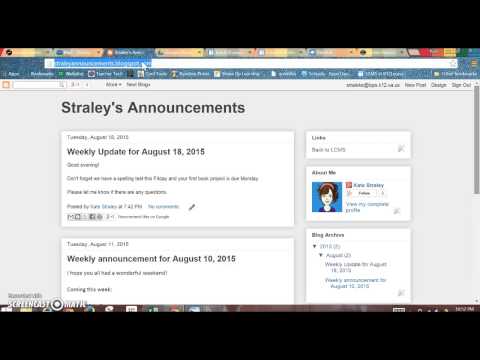
2. Blogger (blogger.com) - If you are sending home weekly or regular emails to a distribution list, you should strongly consider having an announcements page (using Blogger) linked to your Google site.  Your Blogger page can have an email address and by adding that email address to your distribution list, your page gets updated every time you send out an email to that group. The initial setup takes less than 15 minutes and then there is no additional effort required, unless you choose to fancy up your Blogger page.
Here is a 10 minute video that walks you step-by-step through the process: 

If there are any questions, please feel free to contact your school's ITRT! We look forward to working with you this year!

Thursday, May 5, 2011

Who doesn't like snacks???

This will be my last post of the 2010-2011 year... wow the year went by fast! I have already started making plans for the upcoming school year and I know many classroom teachers are as well. This site was recommended in my Twitter feed this morning and it looks like a fun way to share content so when you are thinking about projects for next year, keep this site in mind: flipsnack.

What flipsnack does is takes a PDF file and turns them into an online book. I don't have lengthy self-created PDF files on my computer so I just used one that I was reading today:


Here is another very short one of some of my own Publisher files. I just combined three different Publisher posters together into one Publisher document, printed it as a PDF using the free CutePDF Writer, and uploaded it to flipsnack.


How cool would it be to have your students create posters on topics they are studying and then to put the projects together in a PDF, upload it into a book and have that book available online for review? Or maybe create a book to show off final projects? Registration is required and final books can be embedded in a blog like I have done or the book's direct link can be shared with others.

So along with flipsnack came a few other "snack" applications, accessible from the same site (bottom of page) using the same login. One is bannersnack, which changed my individual images into an animated image. Mine includes only two images but you can make longer ones, you can pick different sizes, and you can add text.

.

There is also quizsnack. If you create a poll (only one answer can be marked) or a personality quiz (like ones you might have seen on FB) you can see the responses when you log into your account. Unfortunately, while users of free accounts can make surveys (visitors can mark as many answers as they wish), users cannot see the results for free so Google forms might be a better option in that case. Here is a short poll I created...


Response data can be put right on the widget for all to see or kept private so it is only available when you log into your account

Guilt free snacking! Gotta love that!

Wednesday, December 1, 2010

Developing a PLN...

A PLN (Personal Learning Network) consists of everyone you interact and exchange information with. The difference between a PLN now, as compared to even a decade ago, is how easily one can add to his or her PLN using online tools. For example, occasionally I hear about technology tools and integration ideas from my fellow ITRTs and from the educators in my building but unfortunately, our chances to communicate regularly with such differing schedules is tough. Most of the time, and I would estimate that number to be close to 90%, my online PLN is the sources of my information because that information is available 24/7.

Why develop a PLN? Well, a strong PLN offers many benefits to educators including professional development as you learn from content-area specialists; a way to locate resources, new lesson plan ideas and technology tools to enhance learning; the opportunity to work with others in your field around the globe; and a way to keep up to date on the latest education news.

There are many ways to build your online PLN but too much at one time can be overwhelming. To get started, I highly recommend adding the following three resources to your PLN:


1. Twitter (micro-blogging)

I have to admit I was a Twitter doubter for a long time. Statements limited to 140 certainly could have no value in my busy life and really, is it really a necessity for me to know who is at the grocery store? But I decided to try it out one day and I was hooked. Let me also add that I do not use Twitter to its fullest; I have posted "tweets" (140 character statements) only a handful of times (and there are lots of others just like me - here is a great, short article about being mainly a Twitter reader). But just reading my Twitter feed for a few minutes a few times a week has been incredibly valuable. Not only can you follow specific educators from all over the world (a few favorites are on the Twitter feed in the right column of this blog), but there are education specific conversations you can follow... focusing on the level you teach and/or the content as well as general education chats (this page can be overwhelming but I want to list it here for future reference; your ITRT can help direct you to specific chats). Click here for a blog entry on ways to use Twitter in your classroom. Let your ITRT know if you are interested in more hands-on training in using Twitter.


2. Delicious (social bookmarking)
There are several places to store bookmarks online but one that is quite popular and that I use regularly is Delicious (delicious.com). Once you are logged in you can start saving the URLs of the sites you want to store, tag them by topic, enter comments about the site, and even see how many other Delicious users have bookmarked that same site. The "social" part comes in because your bookmark list can be seen by others (though you can control this if you don't want that to happen) which means you can see other's bookmarks. There is a search feature where you can search by tags or by what is popular. If you find other educators teaching the same topics or grade level that you are teaching, their bookmarks will often be just as helpful as the sites you have bookmarked yourself, with a little less time involved researching! Here is a link to my Delicious bookmarks for you to check out!


3. Following Blogs
Does the thought of having your own blog seem overwhelming? Then start by reading them! Many educators have blogs that are worth reading to collect new ideas, collaborate, or sometimes just to feel like you are not the only one battling a certain issue in your classroom. One blog I highly recommend for everyone to read is Larry Ferlazzo's Websites of the Day. He may not teach the same course, content, or level as most of us, but his posts are always full of new ideas and web tools appropriate for many of us and his blog is easy to navigate to find topics he may have posted about previously. And if you go to his blog and subscribe for email updates, you will receive his blog posts via email, once a day, so you don't even have to remember to go to the blog! Subscribe here by entering your email address!

Another blog I highly recommend for ideas for all levels is the one at Learning Today. Again, you can enter your email to subscribe right on the main page and the blog entries will come to your email account. "Reading" a blog this way is very manageable... you will get minimal emails from subscribing and if the topic doesn't fit, just delete the email. If the topic fits, you may find a new, exciting, or even better way to meet the needs of your students!

And the last blog to get you started is Free Technology for Teachers. This one might be more overwhelming for educators not totally comfortable with new technologies but on the main page he has listed resources for content areas that you might find useful. Again, remembering to check blogs can be hard so have the blog entries sent to you... click here to enter your email address!

And of course, you should subscribe to this blog too! Find the "subscribe" box on the right, type your email address, and hit enter!

If you have a great blog you think others would be interested in following, can offer comments or suggestions on using Twitter, or use a social bookmark site, leave a comment on this post so we can all learn from each other!

Monday, November 22, 2010

Welcome to our Website!

Welcome to the LCPS Instructional Resources blog, created by the Instructional Technology Resource Teachers at Louisa County Public Schools!  We are Amanda Hurd (Jouett Elementary School, Thomas Jefferson Elementary School), JoAnn Marshall (Moss-Nuckols Elementary School, Trevilians Elementary School), Kate Straley (Louisa County Middle School) and Liz Goodwin (Louisa County High School).

Our blog entries each week will feature technology tools and tips to enhance educator productivity and/or classroom instruction. We will also continuously update the links across the top of the page with online resources ~ ones for specific content areas and others that will work in a variety of areas. Don't forget to also check the live Twitter feed for ideas from other educators around the planet!

Feel free to contact us at anytime with suggestions, ideas, or questions. You can do this by leaving a comment on a blog entry or by clicking on one of our names over in the right hand column. 

This blog is designed in Blogger... a great tool for educators to use to keep parents informed about what is happening in the classroom with the ability to not only write about activities but to embed videos, podcasts, pictures, and many other projects designed in programs we will be sharing in the coming weeks! Come back soon!

Related Posts Plugin for WordPress, Blogger...